Leave

As part of my UI/UX internship with GovTech, I was involved in making changes to the design of the Leave module under the Workpal application.

The goal was to improve the module by resolving existing usability issues and to ensure that the proposed UI is better aligned with existing user behaviour and mental models, alleviating existing pain points.
Role

Role

UI/UX Designer

Year

Year

2024

Software

Software

Figma

Responsibilities

Research

Prototyping

Usability Testing

Background

Leave is one of the many modules in the new Workpal application. Public officers across different statutory boards can now apply for various types of leaves via the Leave module (i.e. vacation, childcare). However, they can still apply for leaves via other methods like the HRP portal. In light of increasing complaints regarding leave applications on Workpal, I was tasked to dig deeper into these issues.

User Interviews

The research and design process for the Leave module involved several key stages. Firstly, my team and I conducted user interviews with civil servants to understand their needs and identify pain points within the existing module.

Findings & Analysis

From our user research, we consolidated the main issues public officers encountered while using the Leave module.
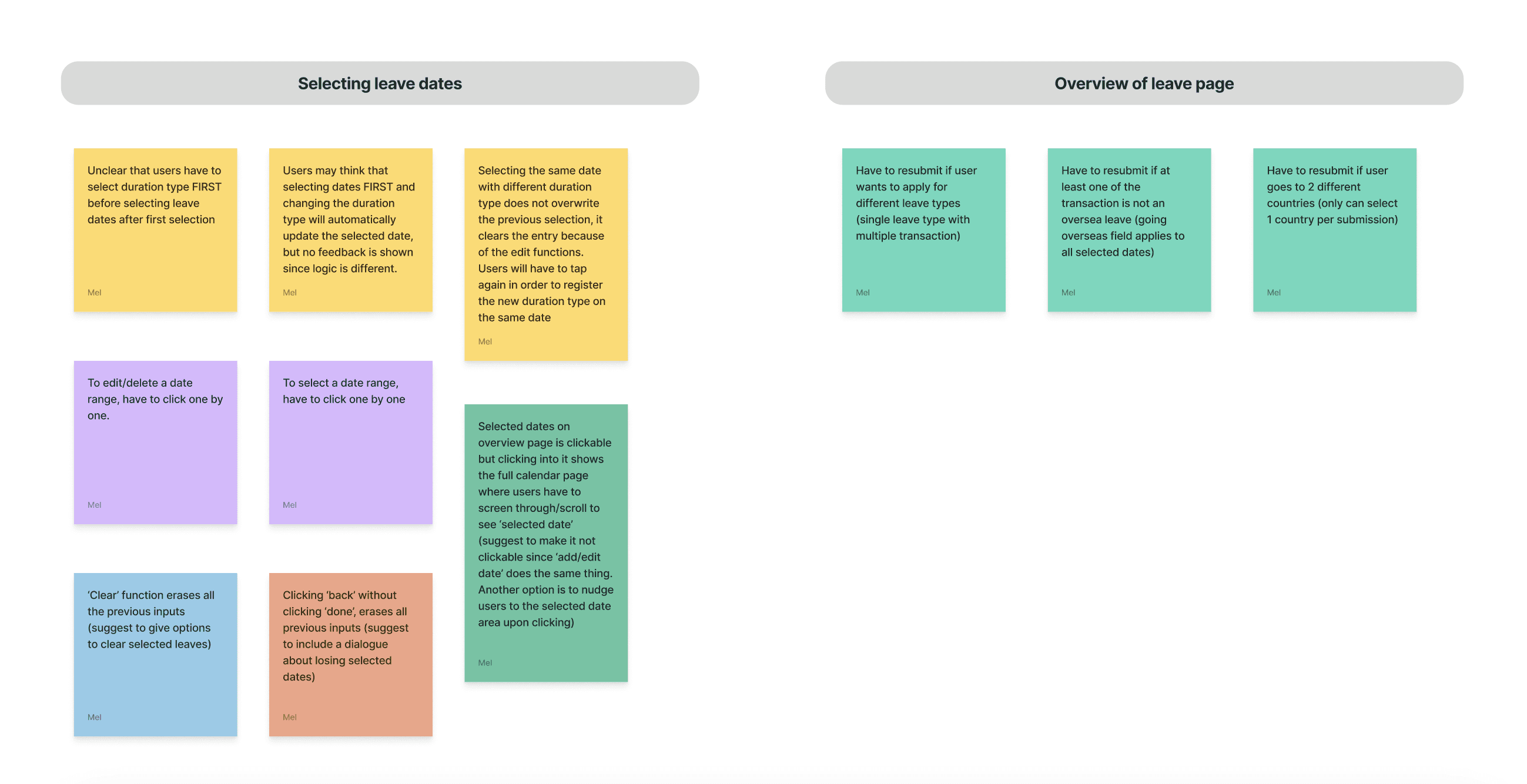
We learnt that these issues arose due to major differences between the user flow for leave applications on Workpal as compared to older portals like HRP which public officers are more familiar with.

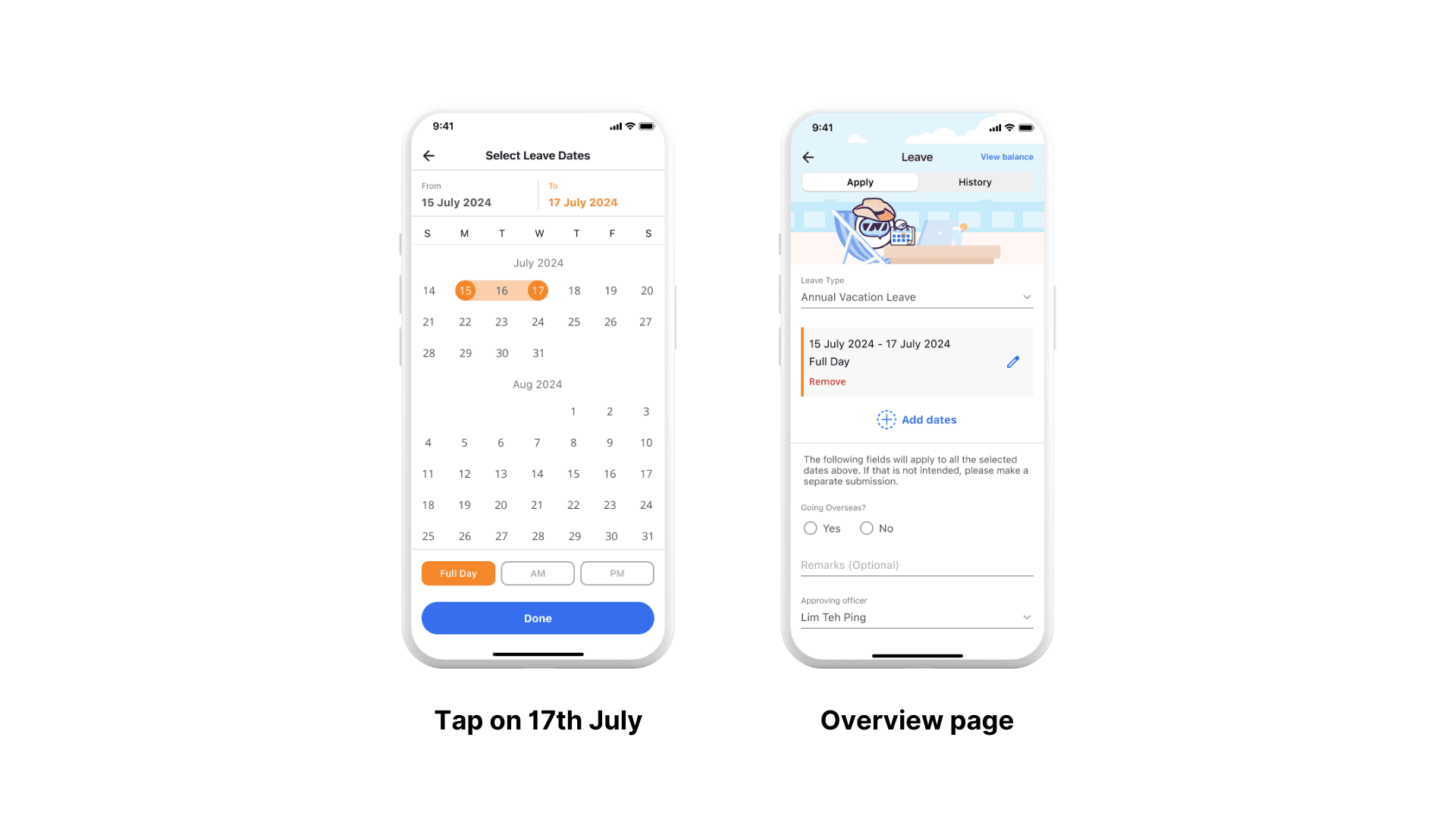
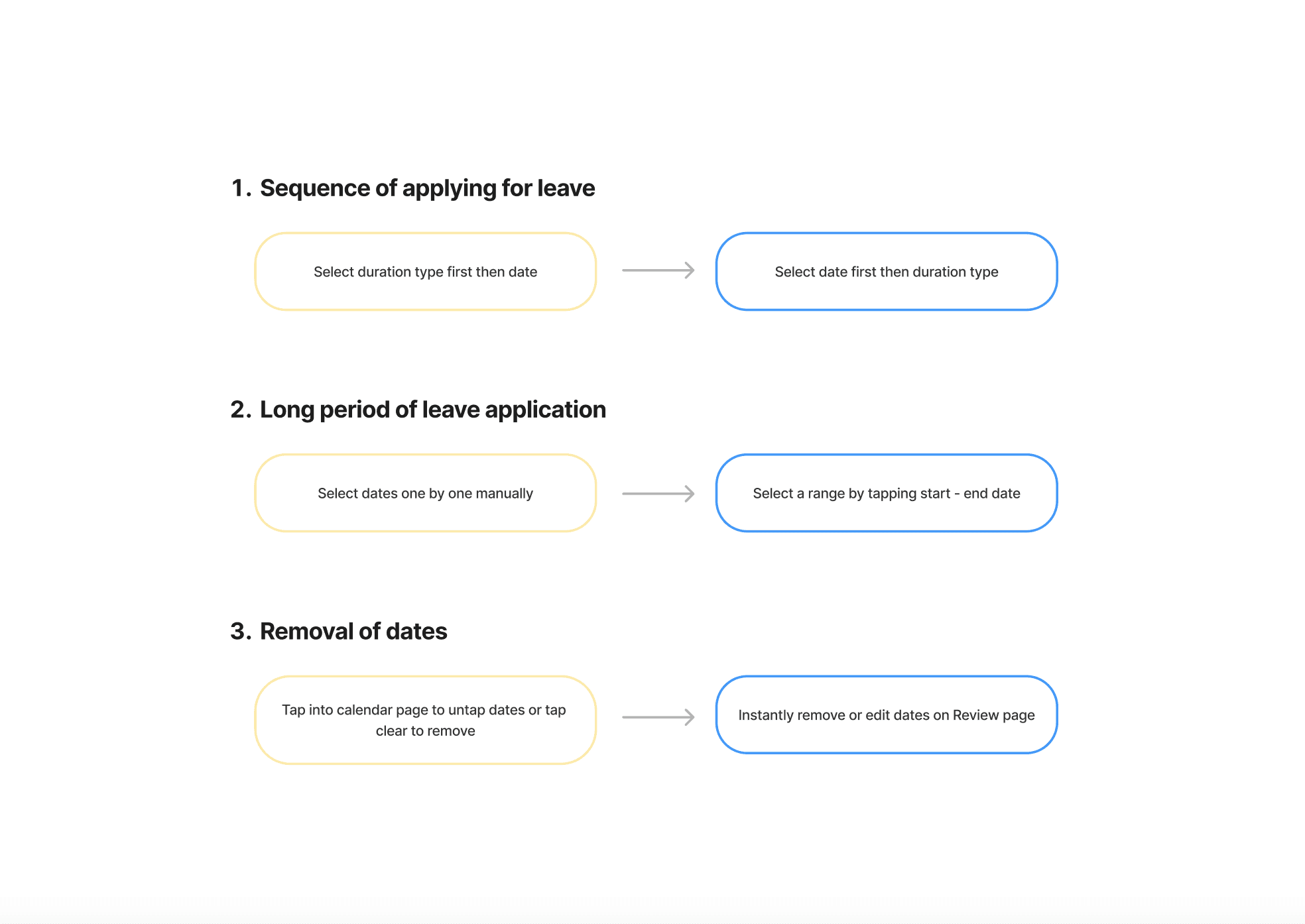
For instance, on HRP, users can apply for long duration range by tapping on a start and end date. However, Workpal only allows for the individual selection of multiple dates.

Feature Roadmap

From the major frustrations expressed during the user interviews, we outlined several key features for the MVP.
High-Fidelity Prototype

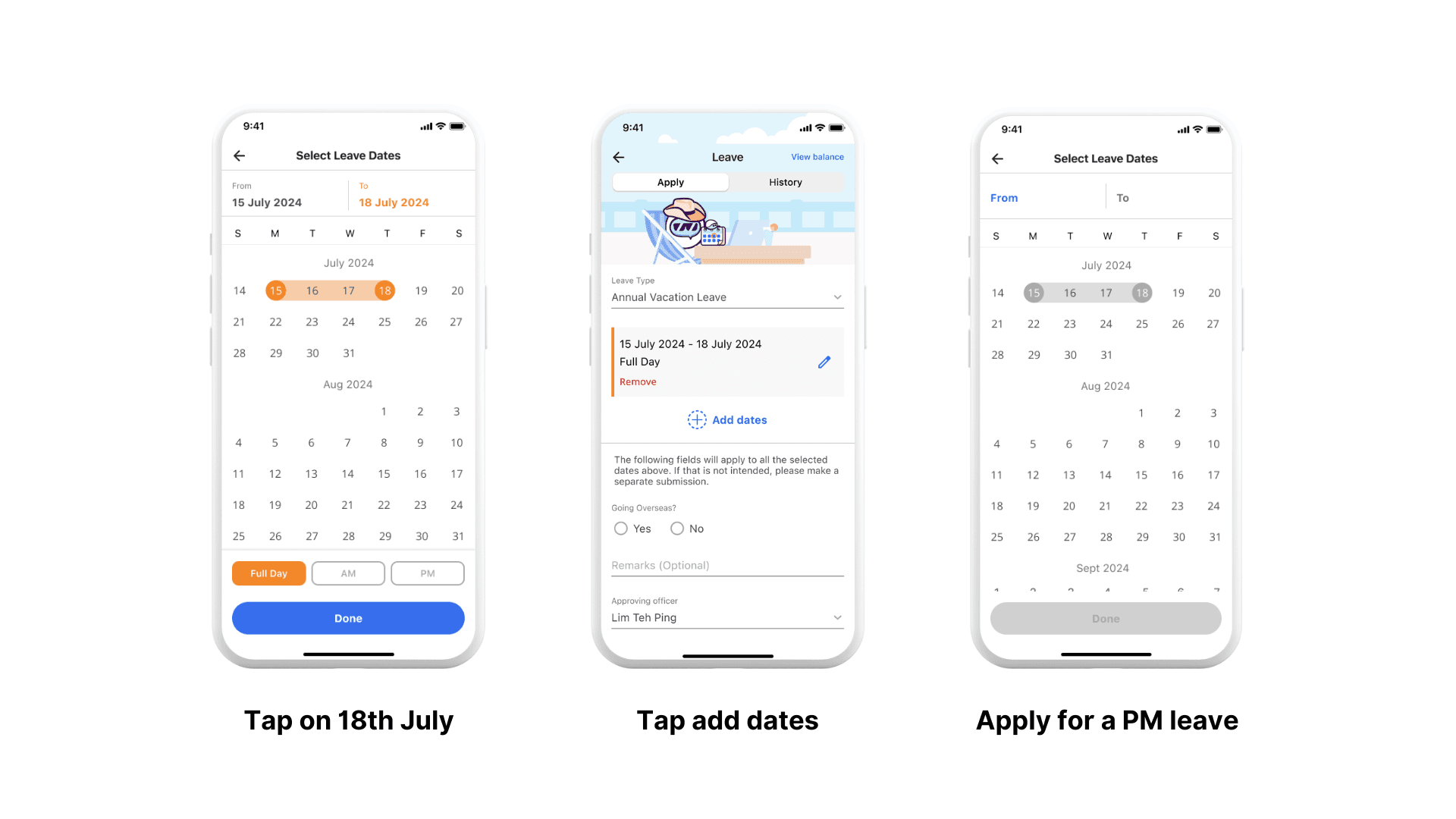
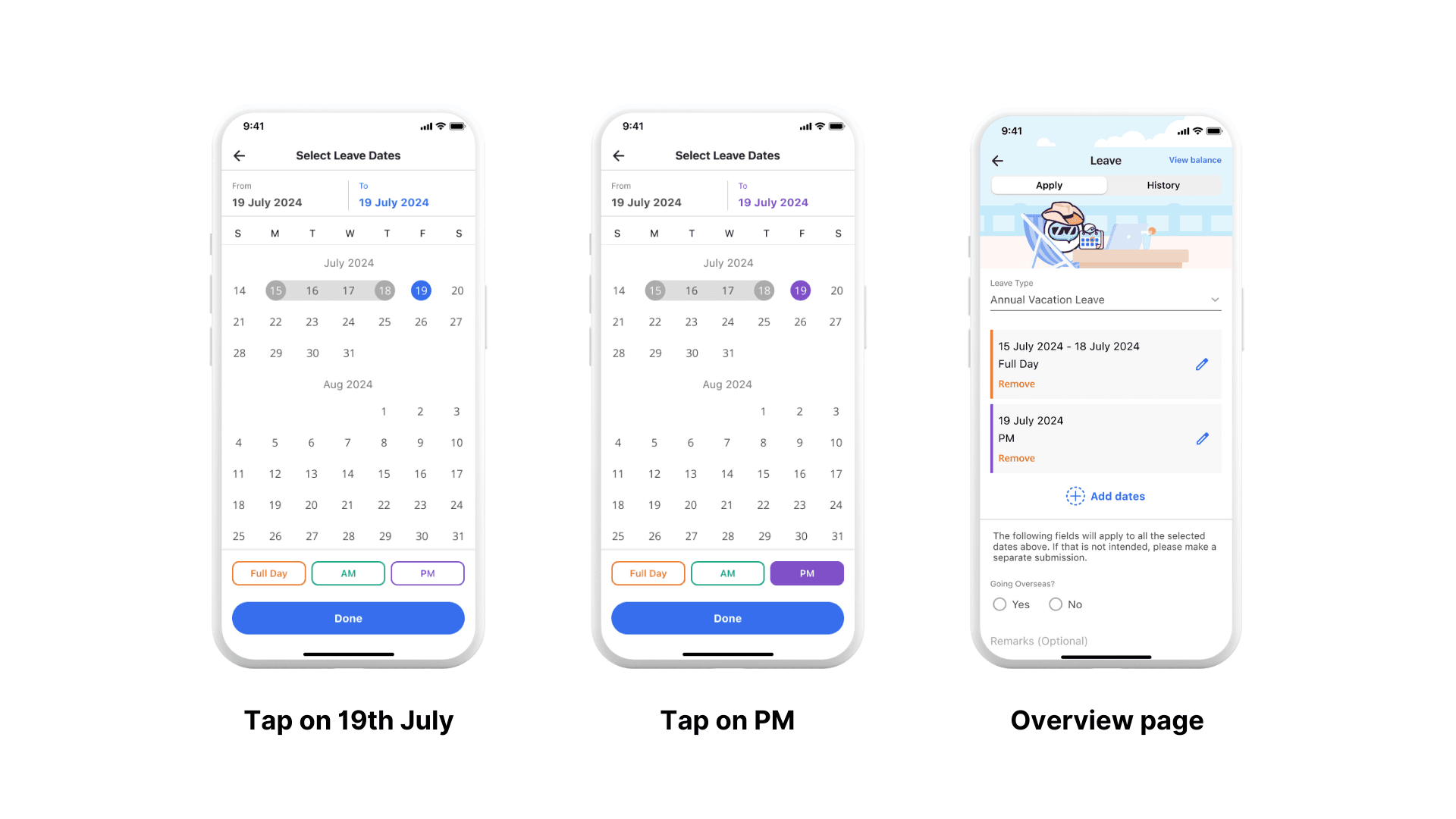
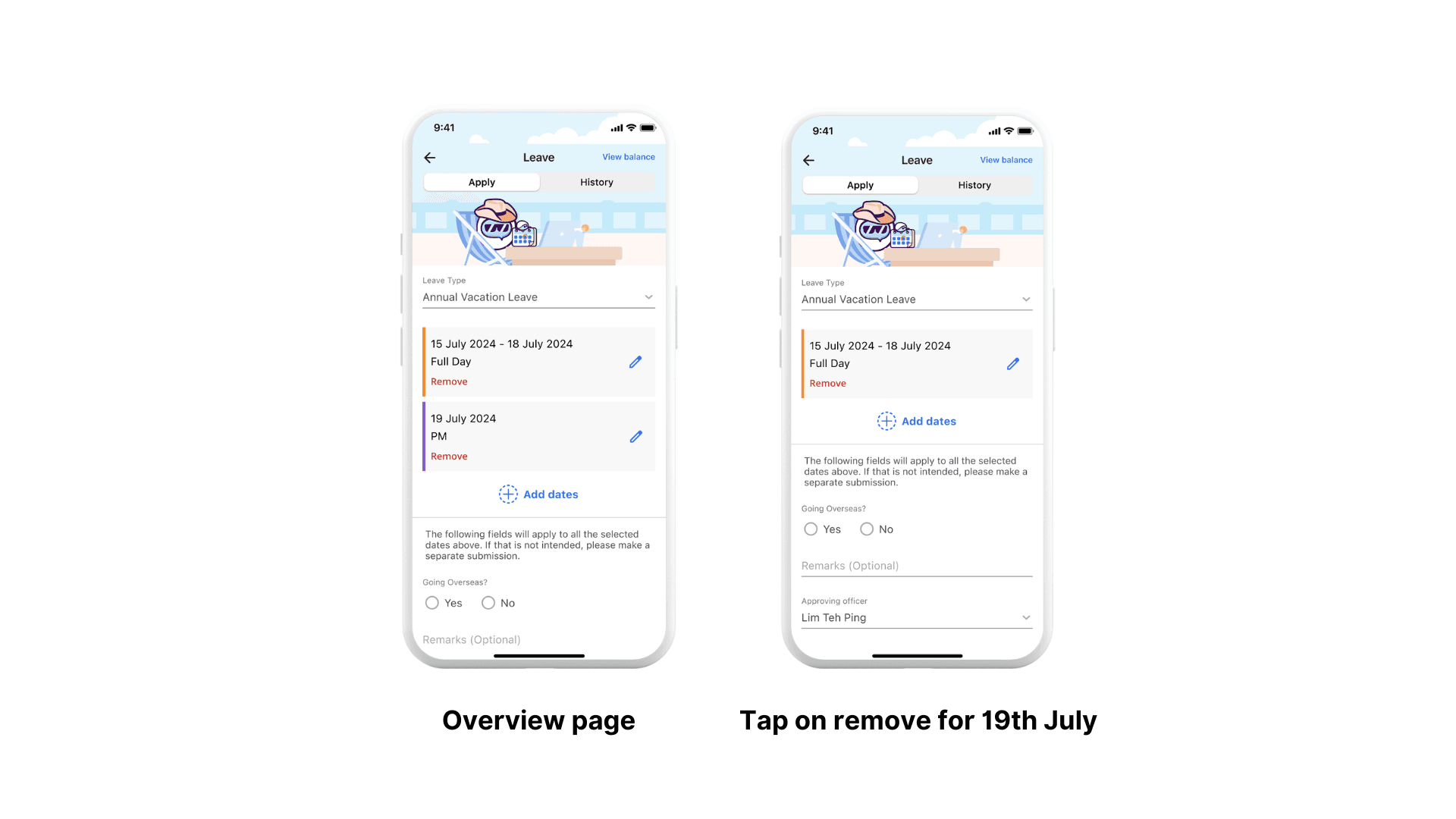
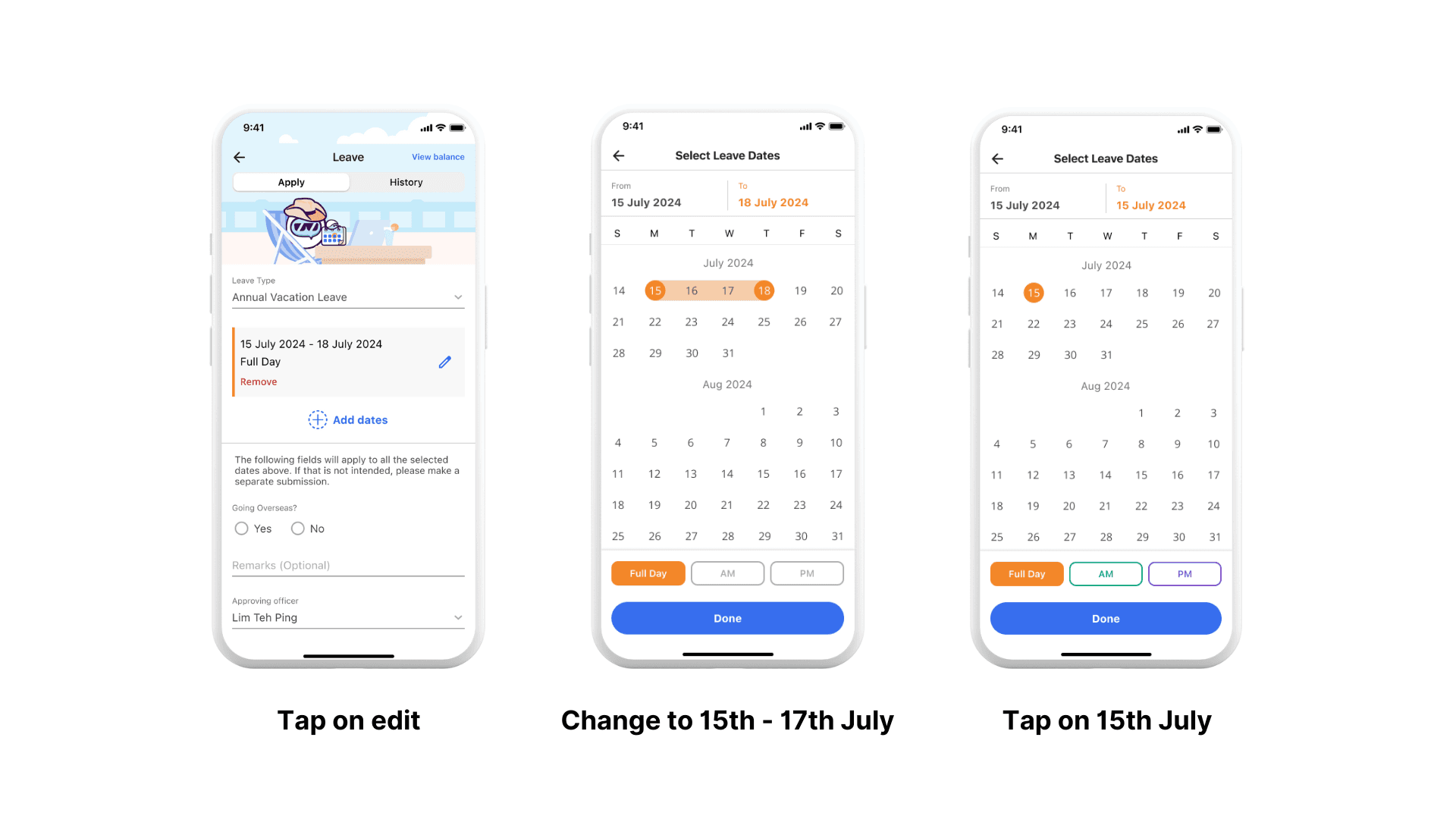
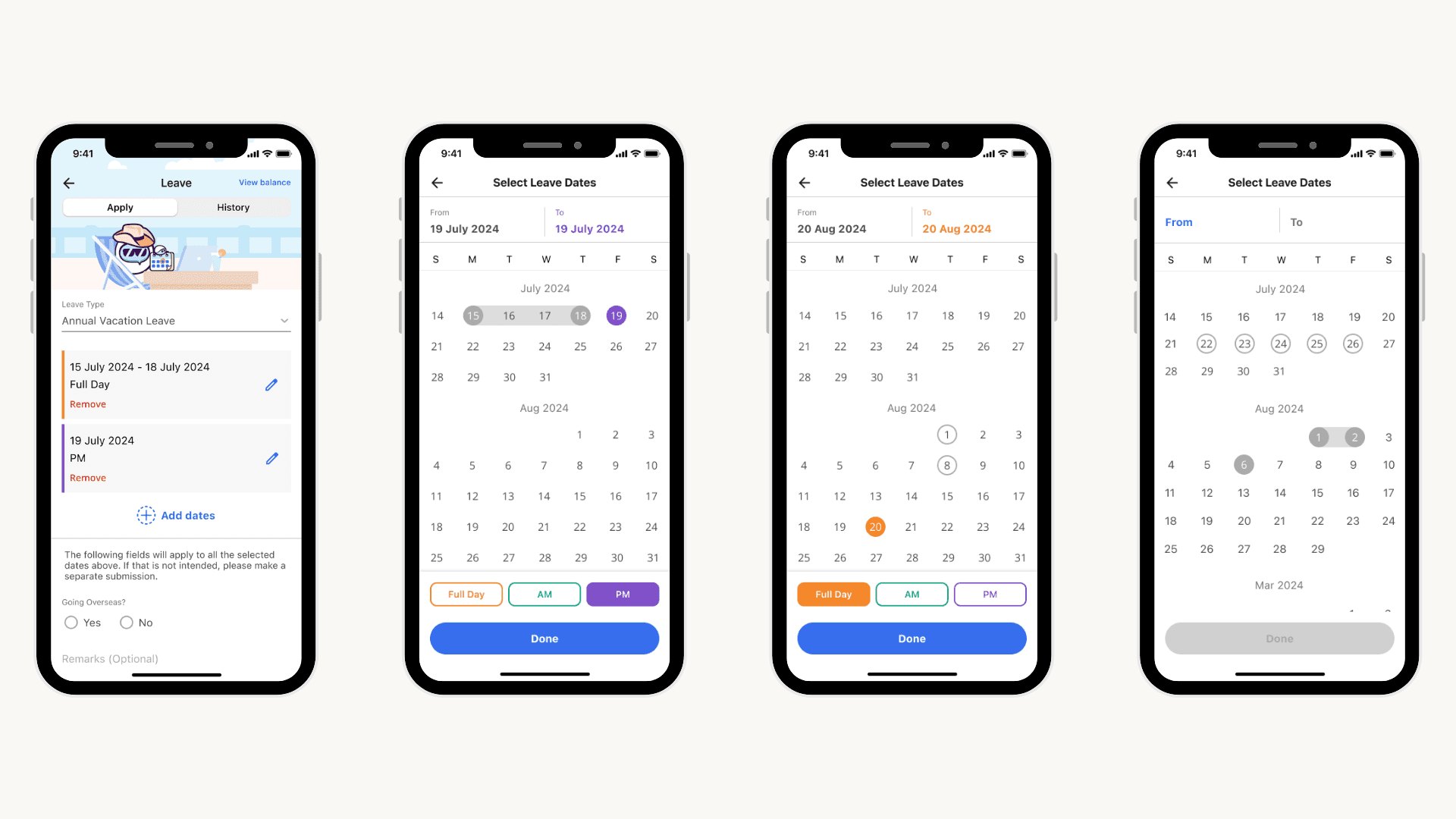
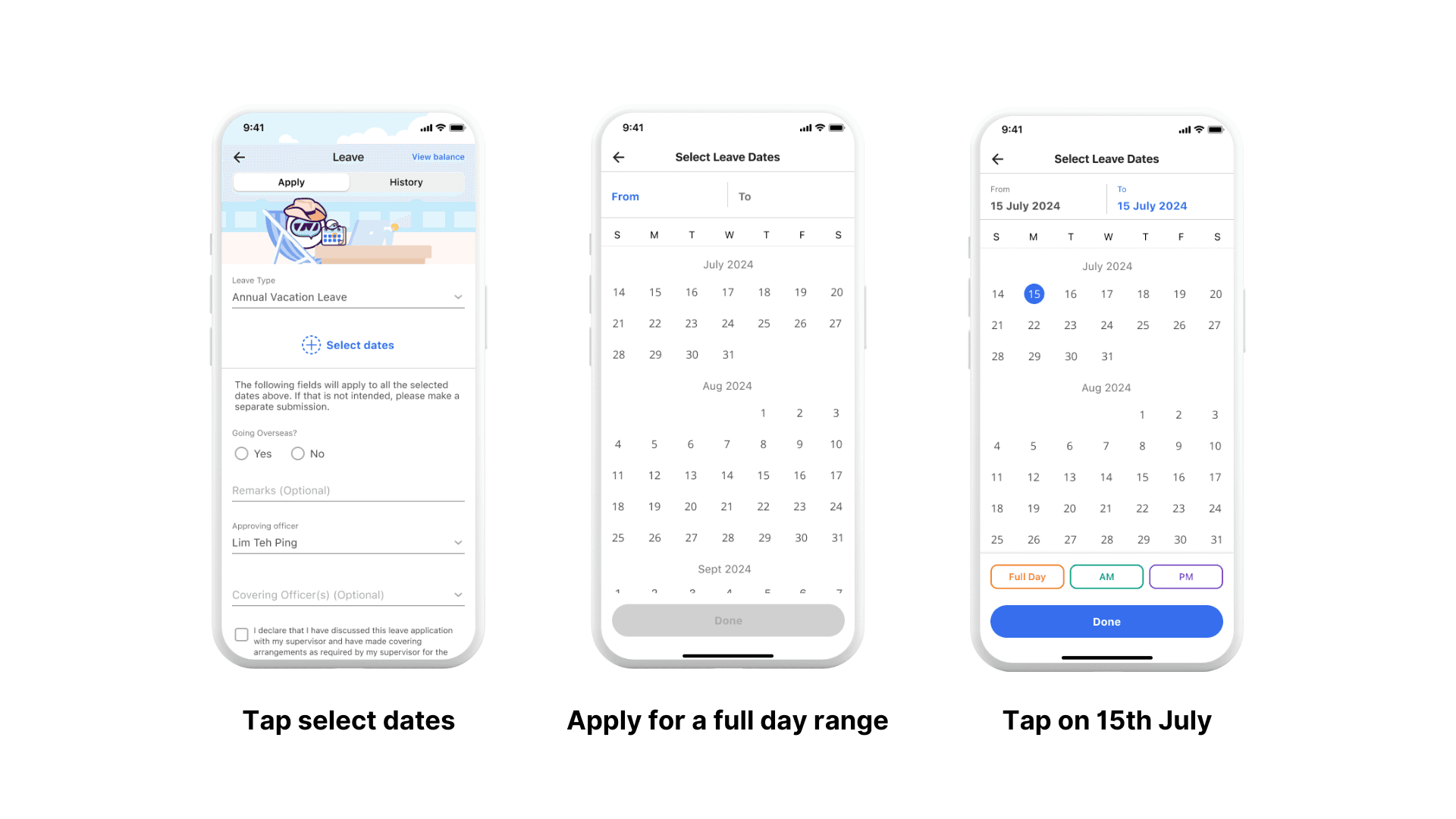
Based on the proposed features, we prototyped the key flows.

  1. Apply for leave on multiple dates with multiple duration types

  1. Remove leave from same application


  1. Edit leave from same application

Usability Testing

We conducted in person usability tests with 6 officers from the public service. Through the UTs, we assessed the proposed design and uncovered any usability issues with the new design.


6

Participants in total

1

Remote session

5

In person sessions

100%

Success rate across tasks

Key Insights

Insight #1

Usability Testing

We are currently conducting in person usability tests with 6 officers from the public service. Through the UTs, we will be able to assess the proposed design and uncover any usability issues with the new design.

6

Participants in total

1

Remote session

5

In person sessions

100%

Success rate across tasks

Behaviour observed:

  • Most users selected a start and end date while 2 users tapped on the dates individually for a range.

  • Both users who tapped on dates individually use the leave mini-app often/recently. They maintain their existing behaviour as there is no visual cue indicating any change in interaction.

  • Users who selected start and end dates do not use the leave mini-app as often. Some shared that they are used to this interaction because it is quicker and more commonly used in hotel/airline booking.

Implication:

  • Requires a brief adjustment period for users to unlearn the old interaction and adapt to the new one.

Mitigating Factor:

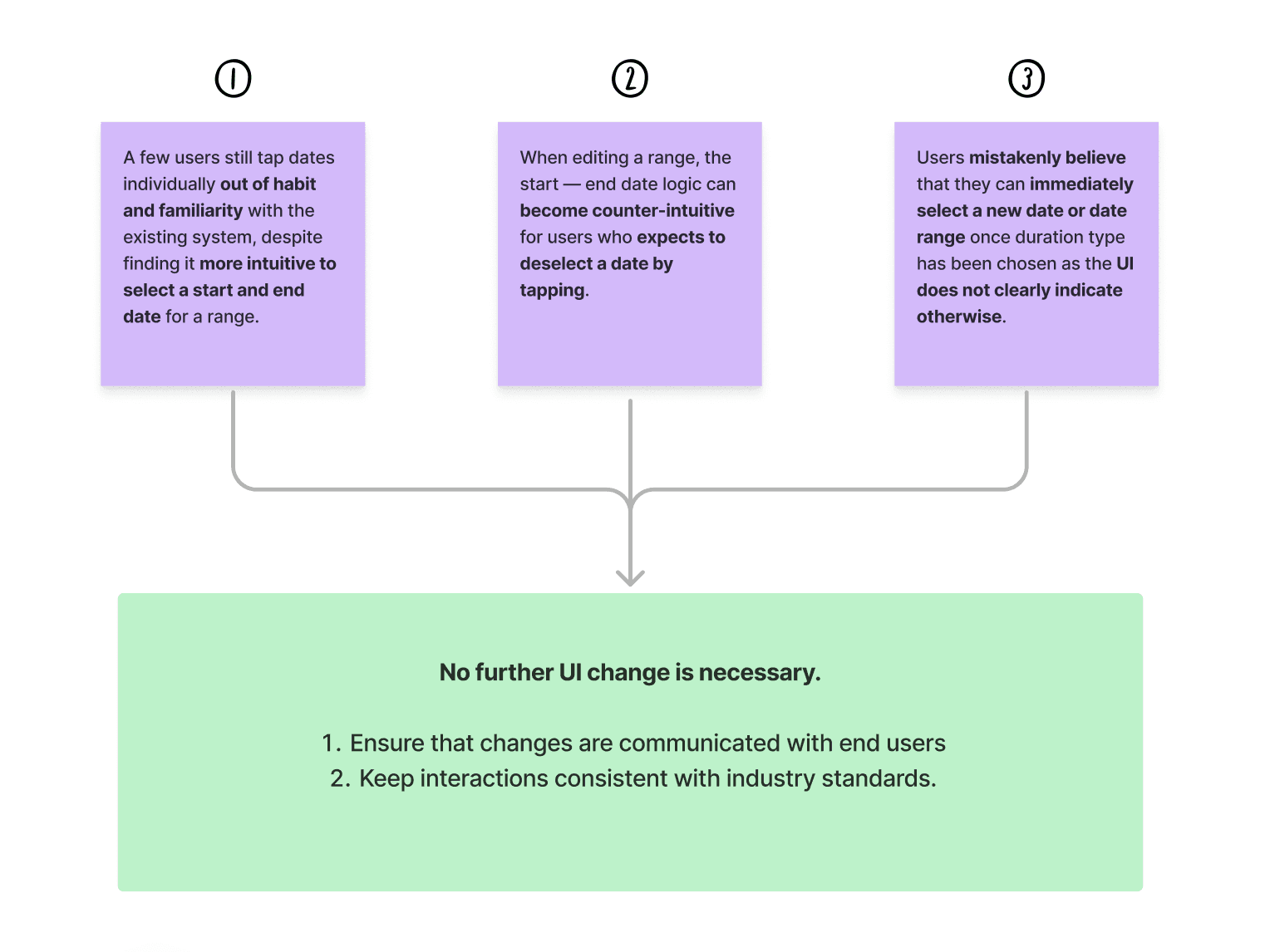
  • Based on past research studies, interaction is considered intuitive and it is widely used across industry standard apps. Hence, learning curve is very low.


Insight #2

Behaviour observed:

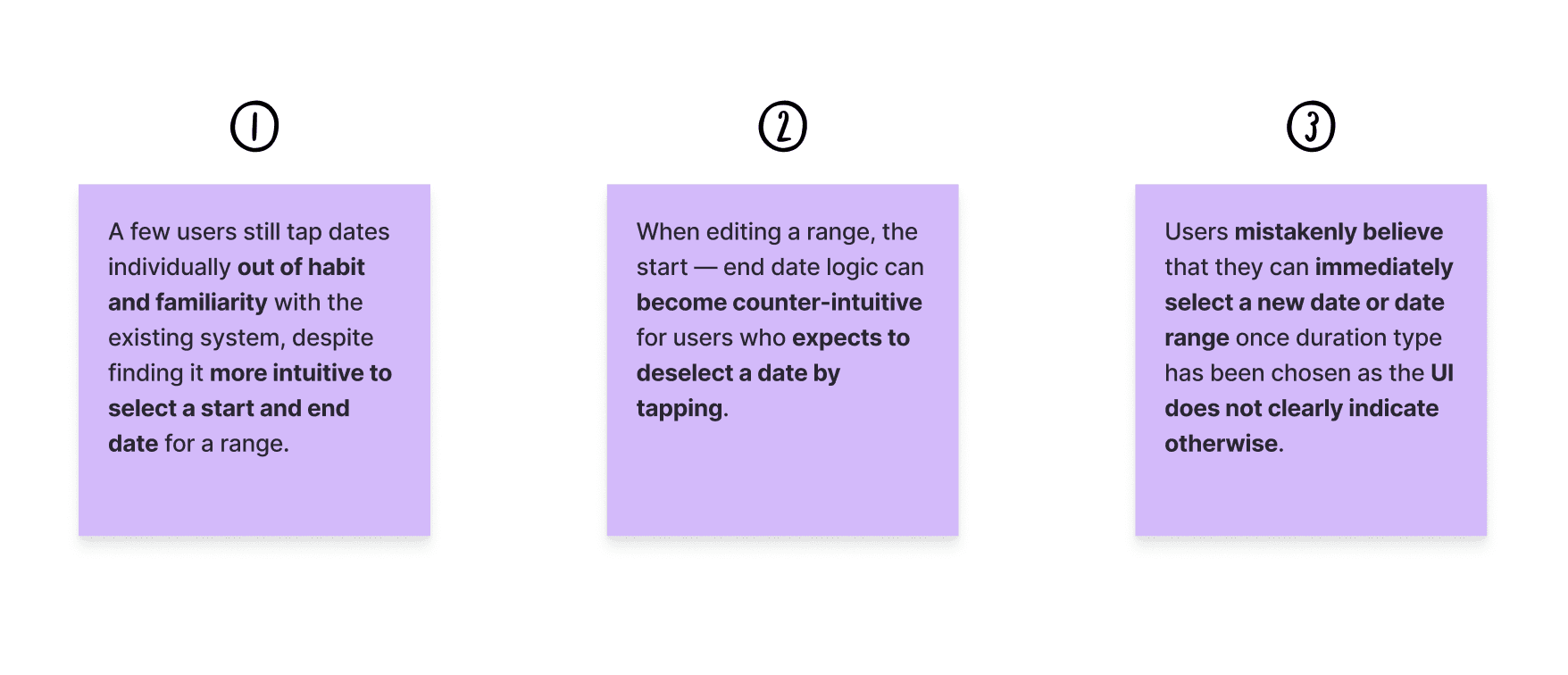
  • Users intend to 'shorten' the date range when they tap on a selected date. This behaviour is learnt from the existing design or similar Ul. However, the date range resets unexpectedly and they had to reselect again.

  • Most users understood and learned from the interaction, while others questioned if they should just remove the entire date range and re-add since it's the same.

Implication:

  • More time-consuming as users need to make additional taps to reselect if users ‘forget’ the start — end date interaction.

Mitigating Factor:

  • Interaction remains straightforward, allowing users to easily recover from mis-taps.

  • Users generally do not edit leave dates often.

  • Interaction follows industry standards.


Insight #3

Behaviour observed:

Two scenarios can happen when users try to apply multiple leave periods:

  1. Select a date range (FD will be the default), then select new date

    • Users recognised the need to apply each period separately based on start - end date logic and were able to do so easily.

  2. Select a single date and select half-day, then select new date

    • Most users did not expect the half-day leave to extend to a full day range and was slightly confused.

Implication:

  • More time-consuming as users need to make additional taps on the page to revert if they try to apply multiple period at once.

  • The process becomes repetitive and cumbersome, especially for users who wish to apply for multiple, single-date leaves with the same duration type.

Mitigating Factor:

  • Majority will not be significantly impacted as only 6% of leave application has multiple entries and about 11% of users submitted multiple entries in the last 90 days.

  • Users could recognise the trade off between date range selection and ability to apply multiple period at once.

Key Insights

Insight #1

Behaviour observed:

  • Most users selected a start and end date while 2 users tapped on the dates individually for a range.

  • Both users who tapped on dates individually use the leave mini-app often/recently. They maintain their existing behaviour as there is no visual cue indicating any change in interaction.

  • Users who selected start and end dates do not use the leave mini-app as often. Some shared that they are used to this interaction because it is quicker and more commonly used in hotel/airline booking.

Implication:

  • Requires a brief adjustment period for users to unlearn the old interaction and adapt to the new one.

Mitigating Factor:

  • Based on past research studies, interaction is considered intuitive and it is widely used across industry standard apps. Hence, learning curve is very low.


Insight #2

Behaviour observed:

  • Users intend to 'shorten' the date range when they tap on a selected date. This behaviour is learnt from the existing design or similar Ul. However, the date range resets unexpectedly and they had to reselect again.

  • Most users understood and learned from the interaction, while others questioned if they should just remove the entire date range and re-add since it's the same.

Implication:

  • More time-consuming as users need to make additional taps to reselect if users ‘forget’ the start — end date interaction.

Mitigating Factor:

  • Interaction remains straightforward, allowing users to easily recover from mis-taps.

  • Users generally do not edit leave dates often.

  • Interaction follows industry standards.


Insight #3

Behaviour observed:

Two scenarios can happen when users try to apply multiple leave periods:

  1. Select a date range (FD will be the default), then select new date

    • Users recognised the need to apply each period separately based on start - end date logic and were able to do so easily.

  2. Select a single date and select half-day, then select new date

    • Most users did not expect the half-day leave to extend to a full day range and was slightly confused.

Implication:

  • More time-consuming as users need to make additional taps on the page to revert if they try to apply multiple period at once.

  • The process becomes repetitive and cumbersome, especially for users who wish to apply for multiple, single-date leaves with the same duration type.

Mitigating Factor:

  • Majority will not be significantly impacted as only 6% of leave application has multiple entries and about 11% of users submitted multiple entries in the last 90 days.

  • Users could recognise the trade off between date range selection and ability to apply multiple period at once.

Recommendations

Options for change management

  • New feature onboarding screens [WIP]

  • Broadcast change via Workpal Message

  • Help centre documentation in case users face issues.

Recommendations

Options for change management

  • New feature onboarding screens [WIP]

  • Broadcast change via Workpal Message

  • Help centre documentation in case users face issues.

Options for change management

  • New feature onboarding screens [WIP]

  • Broadcast change via Workpal Message

  • Help centre documentation in case users face issues.

Options for change management

  • New feature onboarding screens [WIP]

  • Broadcast change via Workpal Message

  • Help centre documentation in case users face issues.

Options for change management

  • New feature onboarding screens [WIP]

  • Broadcast change via Workpal Message

  • Help centre documentation in case users face issues.